Firefox is my favorite web browser. I use it every day. But my god their defaults piss me off. Firefox is 99% excellent software, and 1% bullshit that someone shoveled in there in a hamfisted attempt to "monetize" it. You might say that sounds like a pretty favorable ratio. You still probably wouldn't eat a chocolate cake that was literally 1% bullshit.
Fixing Firefox is pretty easy, though. Here are the things I have done to make it habitable.
1. Turn off the goddamn "Firefox Home" page
The "Home" page is perhaps Firefox's greatest atrocity. This is what you see by default every time you launch Firefox, or open a new tab:
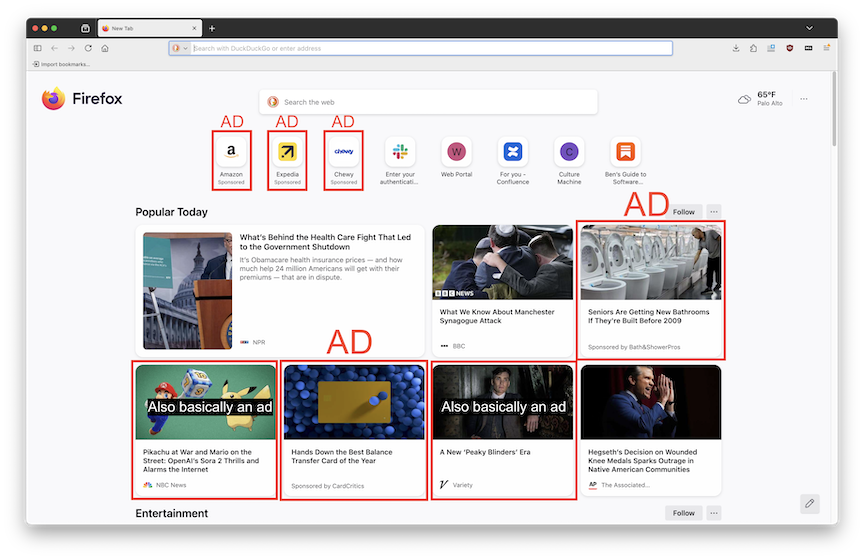
Half of what's on the screen is effectively advertising, but that's not even the biggest issue here. I opened a new tab for a specific purpose. I wanted to search for something or do something. None of this stuff is what I wanted to see. It is 100% distractions that Firefox shoves in my face in the hope that I will forget what I actually wanted to do, and do what some media company wants me to do instead.
This makes me angry. It's hostile to you, the human internet user, and you should 100% yeet it into the Sun, with great prejudice, at the earliest opportunity.
Here's how to do that in the current (May 2026) version of Firefox. The details of these instructions might change over time.
-
Paste
about:preferences#homeinto the address bar to go to the "Home" settings page. -
Alternatively:
- Click the three-lines menu near the top right corner of the window (this is called a "hamburger menu" in the tech industry. You'll thank me for that knowledge later.)
- Select "settings" near the bottom of the menu.
- Then click the "Home" tab on the left side of the screen.
-
Under "Firefox Home Content," uncheck the box for everything you don't want to see.
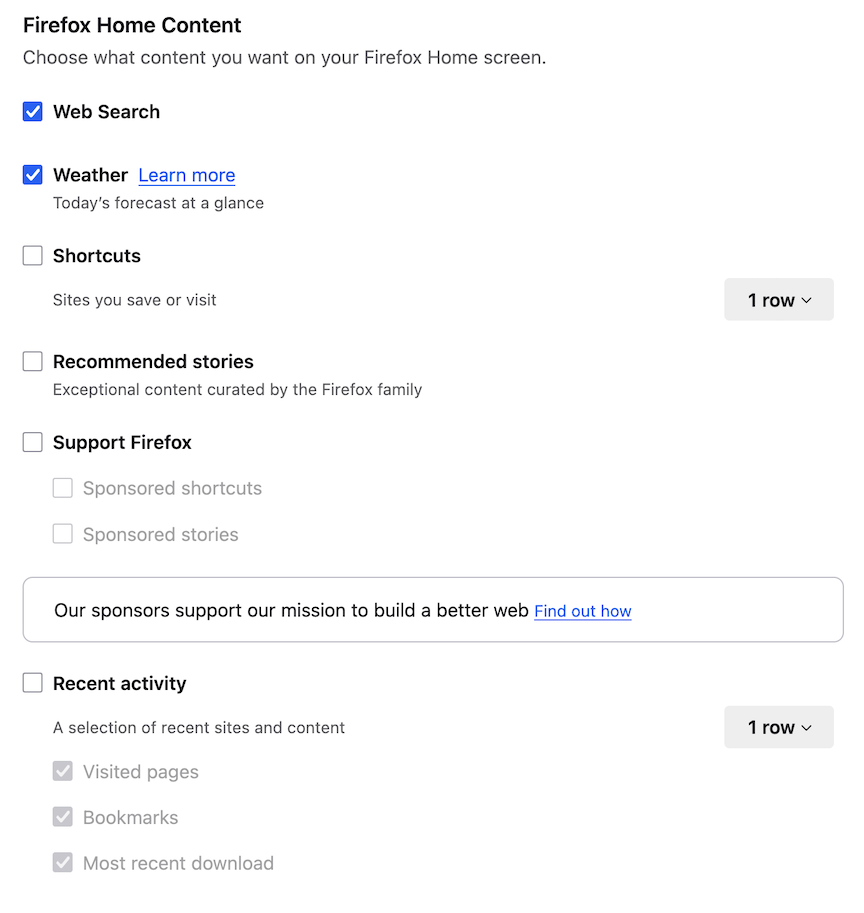
That's it! Your settings are saved automatically.
Firefox tries to guilt you into keeping the "sponsored" features on. "But this is how we make moneyyy! We're making the web betterrr!" If money is what they want, why don't they put a link to their donations page next to the setting to turn off sponsored features? Honestly, this omission seems like an expression of contempt for their users. They would rather strip-mine people's attention and fill their empty brainspace with drivel than sell an honest product at an honest price.
Did I mention that Firefox is one of the better mainstream web browsers? Yep, in spite of all this shit, the others are even worse.
2. Even better: set your own New Tab page
You can go one step further than customizing the Firefox Home page. You can use the New Tab Override extension to display a webpage of your choice when you open a new tab. For example, I set my new tab page to a searchable list of my most-visited links.
- Go to the "Home" settings page,
about:preferences#home. - Paste the URL of your chosen webpage into the "Homepage and new windows" box.
- Go to the New Tab Override page and click "Add to Firefox."
- Click the extension's icon in the toolbar. That will open a new tab with the extension's settings.
- Choose "current home page" from the list of options.
Now your chosen webpage will be shown every time you open a new tab.
Honestly, this feature should be built into Firefox. Why they don't let you set a homepage for new tabs, only for new windows, is beyond me.
3. Change the color scheme
By default, Firefox's tabs are very low-contrast: it's hard to see which tab is active out of the corner of your eye. If that bothers you as much as it bothers me, you can change the colors.
- Install the Firefox Color extension.
- Open the color scheme editor.
- Edit to your heart's content.